If you are asking why am I not getting matches on dating apps, the honest answer is that low match volume is usually a visibility problem, not a verdict on you. Apps rank profiles, and the ranking reacts to how your photos read, how your prompts sound, how tightly you have set your filters, and how much you swipe. Work through those four things one at a time and the number moves.
The most common mistake is treating every quiet week as a personal failing. A profile can be perfectly fine and still sit unseen because the search radius is 3 miles, three dealbreakers are stacked on top of each other, or the app simply has fewer people nearby than you assume.
Here is the diagnostic order that works: visibility first, then photos, then profile text, then settings, then behavior. Most people start at step four and burn a month of evenings on it.
Table of Contents→
- Why Am I Not Getting Matches on Dating Apps?
- How Dating Apps Decide Who Sees Your Profile
- Why Am I Not Getting Matches on Dating Apps? Common Causes
- Improve the Photos That Represent You
- Write a Profile That Makes Matching Easier
- Check Your Discovery and Matching Settings
- Fix the Behavior That May Be Suppressing Matches
- How Many Matches Are Normal on Dating Apps?
- How to Tell If an App Itself Is the Problem
- A 7-Day Plan to Get More Quality Matches
- Frequently Asked Questions
- Where to Start This Week
Why Am I Not Getting Matches on Dating Apps?
Five things explain nearly every case of no matches: your profile is not being shown to enough people, the photos are not earning likes, the written sections give a stranger nothing to work with, your discovery settings are narrower than you think, or the app you are using has different rules than the one you are comparing against.
A sixth cause sits underneath all of them. Every dating app is a marketplace with more people looking than being looked at, so your profile competes for attention rather than waiting for it.
Good news: the first four are fixable this week without paying anyone anything.
How Dating Apps Decide Who Sees Your Profile
None of the major apps publishes its full formula, and the systems change. The general shape, though, is stable enough to reason about. Most recommendation systems start with hard filters: age range, distance, gender preference, dealbreakers. Fail a hard filter and you are not in the running at all, no matter how good your profile is.
Past the filters, apps rank what remains using signals they can read. Profile completeness matters because an empty prompt box gives nothing to rank. Prompt responses carry more weight than many people expect, especially on apps built around prompts. Photos get read for clarity and for whether they invite a comment.
Behavior feeds in too. Sessions, how long you stay, whether you send a message after a match, whether the people you pick also match back. Some apps weight a small set of paid features heavily, which is why a boost can change your week and do nothing the next week.
One structural detail explains a lot of frustration: men are usually the larger group on swipe-based apps, so a man’s profile is shown to fewer women per swipe, while a woman’s profile gets shown far more often. The same profile, same photos, produces different match totals on different apps for that reason alone.
That is why cross-app comparison is misleading. Someone with 60 matches on one app and three on another usually has not changed anything about how they look.
Why Am I Not Getting Matches on Dating Apps? Common Causes
These are the causes that show up again and again, roughly in the order they are worth checking.
- Your lead photo is hard to read. Small, dark, group-heavy, or heavily filtered photos get skipped fast at thumbnail size.
- Your prompts are generic. “Tell me something funny” is answered by thousands of people, and the ones who answer it well are already getting the likes.
- Your filters stack. A 5-mile radius, a 3-year age window, and two dealbreakers can reduce a city to a handful of people.
- Your profile is thin on details. Nothing specific means nobody has a reason to pick you out of the feed.
- You go quiet. Long absences reset how often your profile shows up in someone’s queue.
- You have more than one account. Duplicate profiles are a fast route to restricted visibility.
- Your age or location settings are unclear. An approximate location or a hidden age filter silently shrinks your pool.
- You swipe indiscriminately. Right-swiping nearly everything tells the system your preferences carry no information.
Why Am I Not Getting Matches? Visibility vs. Conversion
Before you touch a single photo, work out whether you have a visibility problem or a conversion problem. They look identical from inside the app and have opposite fixes.
A visibility problem shows up as almost no views or likes at all. You open the app, scroll a reasonable amount, see few or no new profiles, and the people you do see are thin on detail. A conversion problem shows up as plenty of views, occasional likes, and almost no matches.
Track three numbers over a week: how many profiles you are shown, how many you like, and how many likes come back. Note that apps report these differently, some show views only on paid tiers, and none of them agree on labels. Use whatever each one gives you, consistently.
Many likes sent and few returned points at selectivity and at your own filters. Very few likes sent and few returned usually means you are swiping past most of what you see. Almost no profiles shown in the first place is a settings or account issue, and the next few sections cover it.
Improve the Photos That Represent You
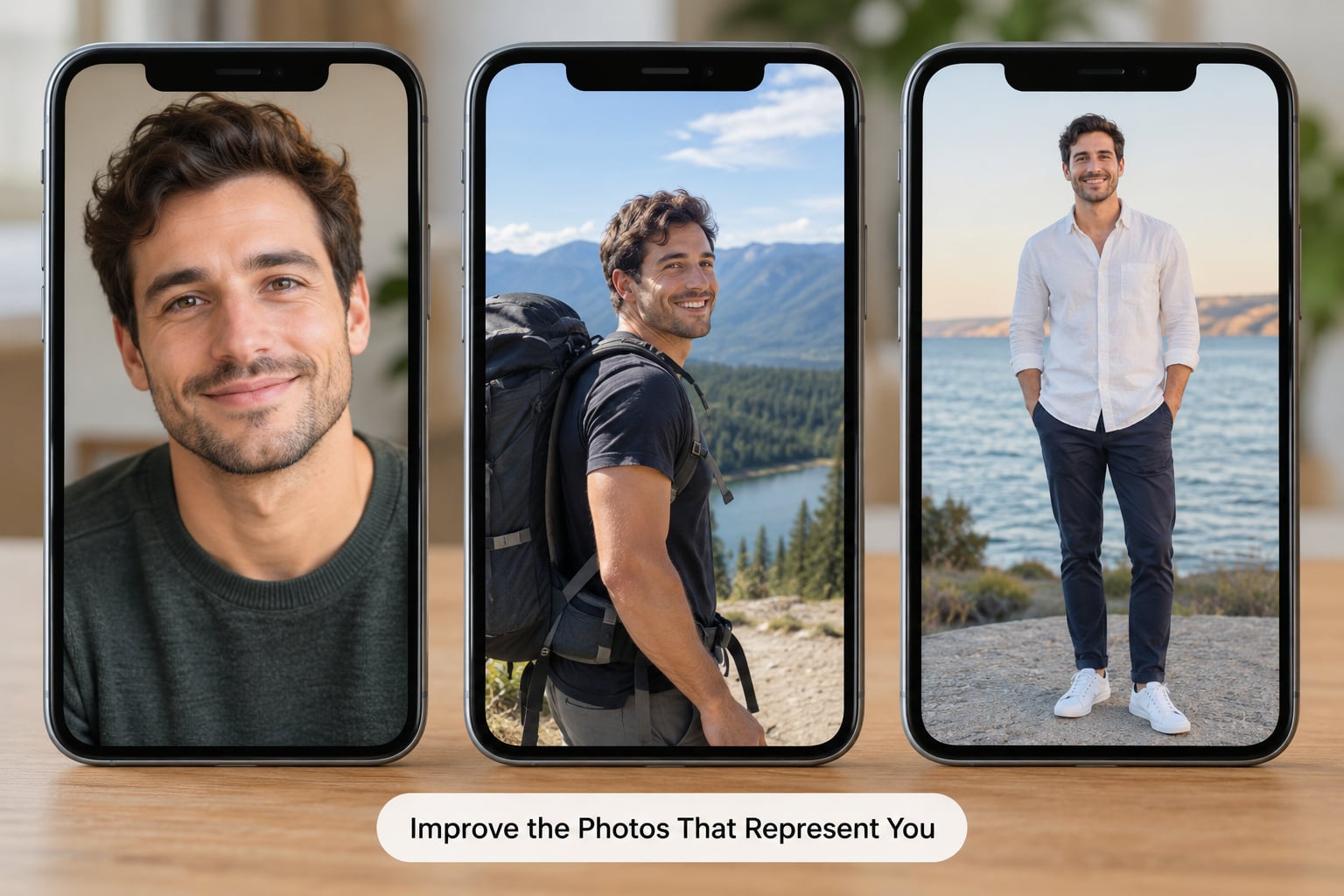
Photos carry more weight than any other part of the profile, and they are the part people are most likely to leave untouched for two years. A working set is three to six images, mixed on purpose.
- One clear close-up. Face visible, decent light, eyes on the camera. This is the only image that has to be genuinely good.
- One full-body shot. It answers a question people are too polite to ask and it quietly tells them you are a real person in real life.
- One activity shot. Cooking, hiking, a dog, a bike, whatever you actually do. It gives a stranger something to comment on.
- One with other people. Useful, but never the lead image and never a group shot where nobody can tell who you are.
Drop the bathroom mirror selfies, the sunglasses in every frame, the beach shot where the sun has blown out your face, and the photo of a plate at a restaurant. They are not terrible photos, they just do not do any work.
A simple replacement test: show your photo set to three people who have not seen it and ask them to describe you in one sentence each. If all three land on the same three words, your photos are working. If they cannot place you at all, the lead photo is the first thing to swap.
Rotate one photo at a time rather than replacing everything at once. If you change all six you lose the ability to tell which change did anything, and that is the whole point of doing it in a measured order.
Write a Profile That Makes Matching Easier
The written sections are where compatible people decide whether to spend a like. The test is simple: after reading your prompts, can a stranger picture a specific evening with you? If not, they keep scrolling.
Specificity does the work. “I will absolutely lose a game of settlers to anyone who says they are bad at it” tells someone more than three paragraphs about your personality. Details that sound like a person, not a template, are what create a reason to comment.
Length matters less than most advice suggests. Three prompts answered properly beat six filled with filler, because filler is easy to recognise and easy to skip.
Frame things positively. “I do not do drama” reads as a warning, and “I like low-key weeks and big plans once in a while” reads as a preference. You are not hiding anything, just choosing the frame that describes you accurately without leading with a complaint.
Prompts should be answerable by a stranger in one line. If the answer needs context you would have to supply later, it will not get answered.
Check Your Discovery and Matching Settings
Settings are the quietest cause and the fastest to fix. Go through them once, slowly, with the assumption that you are wrong about at least two of them.
Open the age range and the distance filter. Widen each by a meaningful amount, not a token amount. Then look at dealbreakers and any preference that hides your profile from certain people. Multiple narrow rules multiply, and three moderate filters can equal one severe one.
Check the age setting, the gender and orientation preferences, and whether your location is set to the city or to a specific current place. Approximate location widens your radius but can also blur the pool the app uses to show you to people nearby.
Check whether anything in your profile is set to private or hidden. A locked-down setting looks identical to being ignored in the feed.
Then save. Some apps apply preference changes immediately and some take effect the next time you open the app, and a few only apply after the next session. Close the app fully, reopen it, and give it a few days of normal use before judging the result.
Fix the Behavior That May Be Suppressing Matches
If the photos and the settings are fine, the remaining variable is what you do on the app.
Swipe selectively and at a human pace. Right-swiping almost everything tells the system your preferences are uninformative, and doing it in long bursts makes your session look unlike how a person actually browses. A steady, moderate amount of swiping with real decisions is the behaviour that reads as normal.
Show up regularly. Long absences are the most common reason for the drop-off people describe, where matches flowed for weeks and then stopped. Opening the app for a few minutes most days keeps you in the queue.
Send a message after a match, even a short one. Matches that go silent contribute nothing to how your profile is treated, and on prompt-driven apps the conversation is the main thing being measured.
Keep your details current. A job description, a move, a new interest, an updated photo. Stale profiles drift.
Close down duplicate accounts now, one of them properly. Do not run two versions of yourself on the same platform.
Stay inside the rules. There are no shortcuts here that I can recommend, and anyone selling you a guaranteed visibility hack is selling you something that does not exist.
How Many Matches Are Normal on Dating Apps?
There is no universal number, and any figure quoted as one is a rule of thumb from another city, another age bracket and another app.
What is useful is a rough sense of scale, and a way to track your own trend rather than someone else’s.
| Situation | Typical range per week | What it usually signals |
|---|---|---|
| Small city or town, narrow filters | 0 to 3 | Pool size, not your profile |
| Mid-size city, average profile, normal filters | 3 to 15 | A normal starting baseline |
| Large city, strong photos, wide filters | 15 to 50 or more | Presentation plus volume of people nearby |
| Any app, a few days after a profile reset | Often near zero | Apps give new and reworked profiles time to gather early signals |
| Any app, weeks after being active daily | Should not be exactly zero if you are swiping at all | Worth checking settings and account status |
Compare your last four weeks to your previous four, not to a stranger online. A rise from two matches a week to eight is progress even though eight is unremarkable in absolute terms.
How to Tell If an App Itself Is the Problem
Before you blame yourself, run this sequence. It is slow on purpose, because each step rules something out.
- Update the app. Not just your phone, the dating app itself, from your app store rather than an in-app update prompt.
- Restart the device. Boring, and it fixes more dating-app problems than people expect.
- Check the app’s status page and social accounts. Widespread outages and feed delays get posted quickly.
- Review your account for restrictions. In-app settings usually flag a restriction and often explain the reason. A restricted or limited account looks exactly like being ignored.
- Test without paid features for a short period. If you have a boost or premium running, let it lapse for a week or two and watch what happens without it. It tells you whether the paid layer is doing anything for you at all.
- Try a second app for two weeks. If the same photos and prompts perform normally elsewhere, the problem is app-specific, not personal.
- Save everything before you delete anything. Screenshot your prompts, note which photos worked, list your preferences. A fresh profile with nothing saved is a fresh start with nothing learned.
Speaking of deleting: it is a reasonable last step, not a first one. It costs you history and momentum, and it produces a quiet profile again for a while.
A 7-Day Plan to Get More Quality Matches
Change one thing per day. If you change everything on Monday you will credit the wrong fix and keep the wrong habit.
Day 1, measure. Write down how many profiles you were shown, how many you liked, and how many likes came back over the last seven days. That is your baseline and the only thing that will tell you later whether anything helped.
Day 2, audit settings. Age range, distance, dealbreakers, location, hidden content. Widen by a real amount, save, close the app, reopen.
Day 3, swap the lead photo. One change. A clear close-up, well lit, recent.
Day 4, add two photos. A full-body shot and an activity shot, if you do not already have them.
Day 5, rewrite one prompt. Pick the one with the least effort in it. Make it specific, make it positive, make it answerable in one line.
Day 6, fix your swiping. Slower, more selective, moderate volume. Message one existing match you have been ignoring.
Day 7, look at the numbers. Compare against day 1. Keep what helped, revert what did not.
Then repeat the cycle with the next variable. Most people find one or two levers that actually matter for them, and the rest is noise they had been carrying around.
Frequently Asked Questions
Why do I get no matches even when I swipe a lot?
Swiping volume is not the lever people think it is. Apps read the quality of your choices, not the count, so right-swiping nearly everything signals that your preferences carry no information and your profile gets shown more selectively. Swipe slower, pass on people you would not message, widen your age and distance settings a little, and check whether your lead photo is readable at thumbnail size before you buy anything.
Should I pay for a dating app boost to get more matches?
A boost buys a burst of visibility, not better matches. If your photos and prompts are already producing matches, a boost can widen a good week. If your like rate is near zero, the boost amplifies a profile that still is not converting, and the money goes straight into extra views with nothing behind them. Fix the photos, prompts and filters first, then judge whether a paid feature helps.
How many swipes should I make each day?
There is no useful target, and chasing a number is how people end up right-swiping everything. What tends to work is short regular sessions with real decisions, most days, rather than one long binge that empties your queue. Spread it out, skip people you would not actually message, and message your matches promptly, because that last habit does more for how you are treated than raw swipe counts do.
Does deleting and recreating my dating profile help?
Sometimes, and it is a last step rather than a first. A rebuilt profile loses its history and usually starts quiet while the app gathers fresh signals, so expect a slow start. It is worth trying when you have genuinely changed how you look and the old profile still represents the wrong thing, or after a long inactive spell. Screenshot your prompts and note your preferences first, so you are not starting from nothing.
Why do I get matches but no messages?
Usually the match opened your profile and moved on, which means the photos got past the first glance and something further in did not. The common culprits are generic prompts, a bio that describes categories instead of details, and a photo set where nothing is easy to comment on. Add one image and one prompt that give a stranger an easy opening, and message matches quickly rather than waiting to see if they speak first.
Where to Start This Week
Start with the settings, because it takes ten minutes and it is the cause most often missed. Then swap the lead photo tomorrow and give it a week. Track your numbers on a piece of paper the whole time, because a match count that feels bad is usually a trend that actually moved, and nobody remembers the week they did not measure.
Give it a month before you decide the apps are broken. One week of careful changes is not enough to see anything, and the frustration of checking twice a day is not a signal about your profile at all. If you are still stuck on why am I not getting matches on dating apps after four measured weeks, it is nearly always one of the four causes above rather than the app itself.